Accounts Payable Automation: A 2026 Guide for SMBs

Accounts payable automation is the process of using technology to digitize, validate, route, and pay invoices with minimal manual effort. For small to mid-sized business owners in Florida, this shift replaces paper chases and spreadsheet errors with a digital workflow that moves faster and costs far less. Modern AP automation reduces invoice processing cycle time by up to 85% and enables up to 90% touchless invoice processing. Enterprises that deploy it typically recover their full investment within the first year. If your team still keys invoice data by hand, you are paying a price you do not have to pay.
What tools does accounts payable automation actually require?
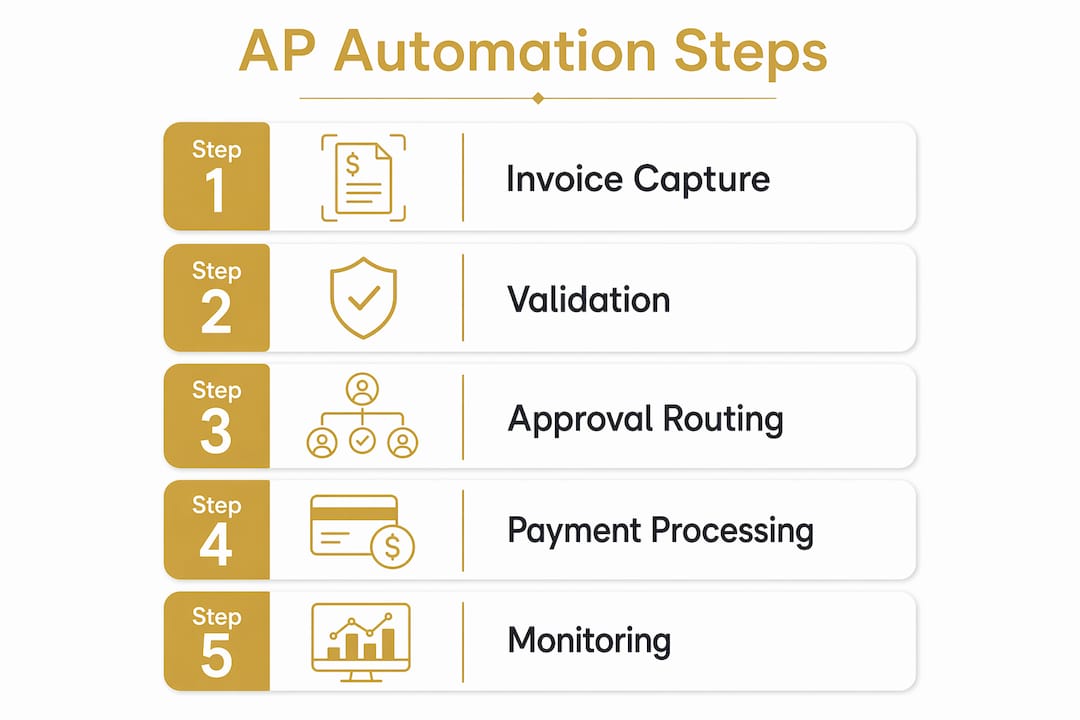
AP automation is not a single product. It is a stack of coordinated capabilities that each handle one stage of the invoice-to-pay cycle.
The core components are:
Invoice capture: Optical character recognition (OCR) and AI extract data from PDFs, emails, EDI files, and supplier portals. No manual keying required.
Validation and matching: The system checks invoice data against purchase orders and goods receipts. This three-way match catches discrepancies before they become disputes.
Approval routing: Rules engines send invoices to the right approver based on dollar amount, department, or vendor type. Approvers get a notification and click to approve or flag.
ERP integration: Bidirectional API integration keeps your AP software and your accounting system in sync. Payment statuses, vendor master data, and GL codes update in real time.
Payment execution: Approved invoices trigger ACH, wire, or virtual card payments automatically, with remittance details sent to the vendor.
The accounting systems most commonly connected include QuickBooks, SAP, and NetSuite. The integration layer is not optional. Without it, your AP software becomes an island, and your team ends up reconciling two systems manually, which defeats the purpose.
Feature category | Purpose in AP automation |
AI-powered OCR capture | Extracts invoice data from any format without manual entry |
Three-way matching | Validates invoices against POs and receipts to prevent overpayment |
Rules-based approval routing | Routes invoices to correct approvers based on preset criteria |
ERP/accounting integration | Syncs payment and vendor data in real time across systems |
Audit trail and compliance logs | Records every action for regulatory review and fraud prevention |

Pro Tip: Before selecting accounts payable software, confirm it supports bidirectional sync with your specific ERP version. A one-way data push creates reconciliation gaps that cost hours every month.
How do you implement AP automation step by step?
A phased rollout that starts with invoice capture and approval routing delivers faster wins than attempting full-cycle automation at once. Trying to automate everything simultaneously is the most common reason implementations stall.
Follow these six stages in order:
Audit your current process. Map every step from invoice receipt to payment. Identify where delays and errors concentrate. This baseline makes your ROI measurable later.
Clean your vendor master data. High-quality vendor data is the foundation of accurate AI matching. Duplicate vendors, missing tax IDs, and outdated bank details all reduce touchless processing rates.
Configure invoice capture. Set up your intake channels: email inbox, supplier portal, EDI feed. Train the OCR model on your most common invoice formats.
Build your approval routing rules. Define thresholds, escalation paths, and exception handlers. A $500 invoice from a recurring vendor needs a different path than a $50,000 first-time purchase.
Integrate with your ERP. Connect your AP software to QuickBooks, SAP, or NetSuite using bidirectional APIs. Test that GL codes, payment statuses, and vendor records sync correctly in both directions.
Activate payment execution. Once invoices flow through capture, matching, and approval without issues, turn on automated payment runs. Start with a subset of low-risk vendors before expanding.
Approach | Outcome |
Phased rollout (capture first, then payment) | Faster wins, lower risk, higher user adoption |
Full-cycle automation at launch | Higher failure rate, longer recovery time, team resistance |
Pro Tip: Run your first two weeks of automated approvals in parallel with your old manual process. This catches configuration errors before they affect real payments.
What are the common pitfalls of AP automation adoption?
57% of AP professionals cite manual data entry and inefficient workflows as their top pain points. Automation fixes both, but only when the implementation avoids a predictable set of mistakes.
The most common pitfalls are:
Skipping data cleanup. Dirty vendor master data produces mismatches that the system cannot resolve automatically. Every mismatch requires a human to intervene, which slows the process you are trying to speed up.
Ignoring compliance from the start. AP automation failure often results from neglecting audit readiness. Build compliance checks and digital audit logs into your configuration before go-live, not after.
Removing humans entirely. Automation handles rule-based tasks well. It does not handle ambiguity well. Maintaining a human-in-the-loop for exceptions keeps you in control without slowing the 90% of invoices that process cleanly.
Launching with too many vendors at once. Onboard your top 20 vendors first. Solve the edge cases with a small group before scaling to your full vendor list.
Fears that automation reduces control are directly addressed by systems that keep final approvals in human hands while automating routine data processing. The goal is not to remove judgment. It is to reserve judgment for the decisions that actually need it.
Pro Tip: Assign one internal owner to monitor the exception queue daily during the first 60 days. This person becomes your subject matter expert and your fastest path to resolving configuration gaps.
What measurable results do businesses see from AP automation?
The financial case for automating your invoice workflow is direct and well-documented. Manual invoice processing costs $9–$15 per invoice. Automated processing costs $2–$3. For a business handling 200 invoices per month, that gap adds up to real money every quarter.
The measurable benefits include:
Faster cycle times. Automation cuts invoice cycle times 3–5 times faster than manual processing. Invoices that took two weeks now close in two to three days.
Higher accuracy. AI and OCR raise invoice accuracy to over 95%, reducing the rework and disputes that drain your team’s time.
Better cash flow control. Faster processing means you see your liabilities sooner. You can capture early payment discounts and avoid late fees with precision.
Stronger vendor relationships. Vendors paid on time and given access to a self-service portal for invoice status stop calling your AP team for updates.
Audit readiness. Built-in compliance checks and audit trails produce 100% audit-ready records without any additional manual documentation.
AP automation also shifts your finance function from a cost center into a source of real financial intelligence. When every invoice is captured digitally and matched automatically, your cash flow data becomes accurate and current, not a week old and partially estimated.
Pro Tip: Set up an early payment discount capture rule in your approval routing. If a vendor offers 2/10 net 30, your system can flag those invoices for priority approval and pay within 10 days automatically.
Key Takeaways
AP automation cuts invoice processing costs by up to 80% and reduces cycle times by up to 85%, making it the highest-ROI operational change most small to mid-sized businesses can make in 2026.
Point | Details |
Start with a phased rollout | Automate invoice capture and approvals first before activating full payment execution. |
Clean vendor data before launch | Accurate vendor master records are required for high AI matching rates and touchless processing. |
Keep humans in the exception loop | Assign a daily exception queue owner to catch mismatches and configuration gaps early. |
Integrate bidirectionally with your ERP | Real-time sync of GL codes, payment status, and vendor data prevents reconciliation errors. |
Measure cost per invoice from day one | Track your baseline cost of $9–$15 per manual invoice to quantify savings as automation scales. |
What I have learned from watching businesses automate AP the wrong way
Working with business owners across Florida, I have seen the same pattern repeat. A company buys accounts payable software, skips the data cleanup phase, and launches with every vendor at once. Within 60 days, the exception queue is full, the team is frustrated, and someone suggests going back to spreadsheets.
The problem is never the technology. The problem is treating AP automation as a software installation rather than a process redesign. The software is the easy part. Redesigning how your team thinks about invoice ownership, exception handling, and vendor communication is the hard part.
The businesses that get this right share one trait: they treat the first 90 days as a learning phase, not a go-live celebration. They run parallel processes, review exceptions daily, and adjust their routing rules based on what they see. By month four, their touchless processing rate is climbing and their team has stopped worrying about losing control.
The other thing I push every client on is compliance. Florida businesses in regulated industries, including financial services and healthcare-adjacent vendors, cannot afford an audit trail that was built as an afterthought. Build your digital logs and segregation of duties into the configuration from day one. You will never regret it.
AP automation is not a shortcut. It is a structural change that pays off for years if you set it up correctly. The consulting services at Getjmconsulting exist precisely because most business owners should not have to figure this out alone.
— Josh
How Getjmconsulting helps Florida businesses get AP automation right
Getjmconsulting works with small to mid-sized businesses across Florida to design and implement AP automation strategies that fit their existing systems and growth plans. Every engagement starts with a free consultation and a detailed assessment of your current invoice workflow, vendor data quality, and ERP setup.

From there, Getjmconsulting builds a phased implementation plan tailored to your business, not a generic template. The team has transformed over 50 businesses across financial services, manufacturing, and technology, delivering measurable cost reductions and faster invoice cycles. If you are ready to move from manual AP to a digital workflow that runs itself, connect with the team to schedule your assessment. You can also review the full range of operational consulting services to see where AP automation fits within a broader efficiency plan.
FAQ
What is accounts payable automation?
Accounts payable automation is the use of software to digitize and manage the invoice-to-pay cycle, including capture, validation, approval, and payment, with minimal manual input.
How much does AP automation cost per invoice?
Automated invoice processing costs $2–$3 per invoice, compared to $9–$15 for manual processing, delivering significant savings at scale.
How long does it take to implement AP workflow automation?
A phased rollout starting with invoice capture and approval routing typically shows measurable results within 60–90 days. Full-cycle automation takes longer depending on ERP complexity and vendor volume.
Does AP automation work with QuickBooks or SAP?
Yes. Most AP automation platforms integrate with QuickBooks, SAP, and NetSuite using bidirectional APIs that sync invoice status, vendor data, and GL codes in real time.
Will automation reduce my control over invoice approvals?
No. Well-configured AP automation keeps final approvals in human hands while automating routine data processing. Humans intervene only on exceptions and mismatches, which preserves oversight without slowing the process.
Recommended


Comments